A day planner built around what you do now
Fezer plans your day as a sequence of time blocks and deadlines, then keeps one commitment in front of you at a time. Not a longer to-do list - a clearer answer to "what should I be doing right now?"
The problem with most day planners
A to-do list shows everything you could do, in no particular order. A calendar shows your meetings, but the actual work floats somewhere in between. By mid-afternoon the plan and the day have quietly parted ways, and you are choosing tasks reactively.
A day plan only works if it answers one question at any moment: what is the current commitment? That is the question Fezer is designed around.
How planning a day works in Fezer
Fezer has three surfaces for the day: Schedule, Now and Analytics.
- 1
Lay out the day in Schedule
Add time blocks for focused work, routines and breaks. Deadlines appear as pins on the timeline, so due items sit right inside the day instead of in a separate list.
- 2
Let Now tell you what matters
The Now tab shows your current commitment with clear timing badges: LIVE for what is running, NOW for what should be happening, NEXT for what comes after and DUE for approaching deadlines.
- 3
Track the day as it happens
Switch Schedule to Track mode, or start a session with one tap from Now. Tracked time lands next to your plan as its own column.
- 4
Compare plan and reality
Compare mode puts the planned day and the tracked day side by side, so tomorrow’s plan starts from evidence, not optimism.
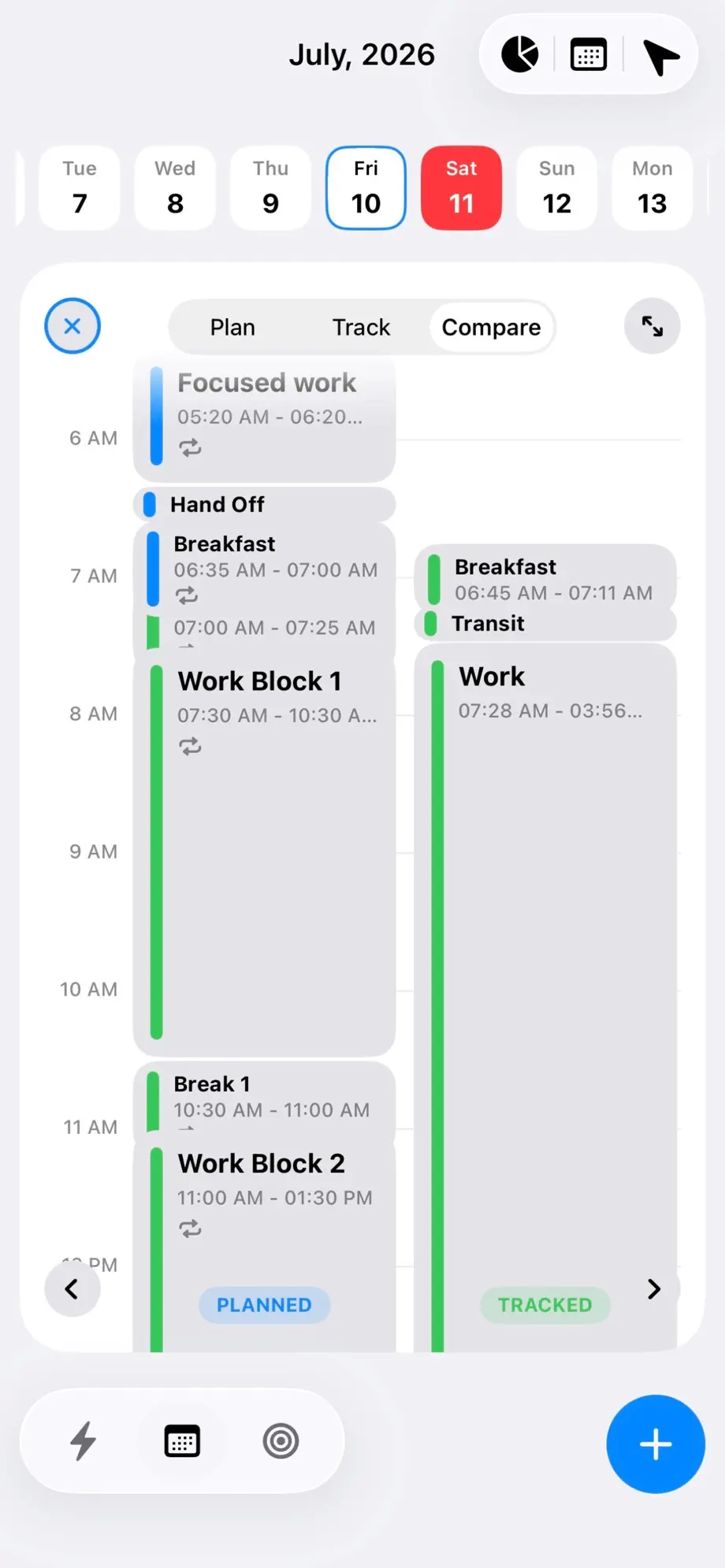
Example: a workday in Fezer
The night before, you block tomorrow: breakfast, two work blocks, a break, and an errand pinned as a deadline. In the morning, Now shows the first block as LIVE and the errand as DUE. When plans shift - they always do - you drag blocks around in Schedule rather than rewriting a list.
At the end of the day, Compare shows that "Work Block 1" started 25 minutes late and the break stretched. Next day’s plan gets more realistic, and the plan keeps being something you trust.
What you get
Time blocks
Plan the day as blocks with start and end times, including repeating blocks for routines.
Deadline pins
Pin due items directly onto the day so deadlines live inside the plan.
Now view
One glance shows what is live, what is next and what is due.
Plan, Track, Compare
Three schedule modes: plan the day, track it, then see both side by side.
Plan-connected scheduling
Commit steps from your plans straight onto the schedule.
Private by design
No account, no server. The whole plan stays on your device.
Own your day with Fezer
Free to plan and track, on iPhone, iPad and Android. No account, no ads, and nothing you write ever leaves your device.