The Sunsama loop, without the subscription or the servers
Sunsama is one of the few planners that takes the same idea seriously as Fezer: a day should be planned deliberately and then checked against what actually happened. The difference is who each app is built for, where your data lives, and what it costs.
Where Sunsama is stronger
Sunsama is a mature product built for professionals. It runs on iPhone, Android, Mac, Windows, Linux and the web, and its whole premise is pulling your working life into one place: more than twenty integrations bring in tasks from tools like Asana, ClickUp, Trello and Todoist alongside your Google and Outlook calendars. Its guided daily planning ritual - set a realistic workload, timebox it onto the calendar, review at the end - is genuinely well designed, and a focus mode can mute distracting apps while you work.
Fezer does none of that aggregation. It is a phone and tablet app with no integrations, no desktop version and no guided ritual. If your day is spread across work tools and a desk, Sunsama is built for exactly that and Fezer is not.
The idea both apps agree on
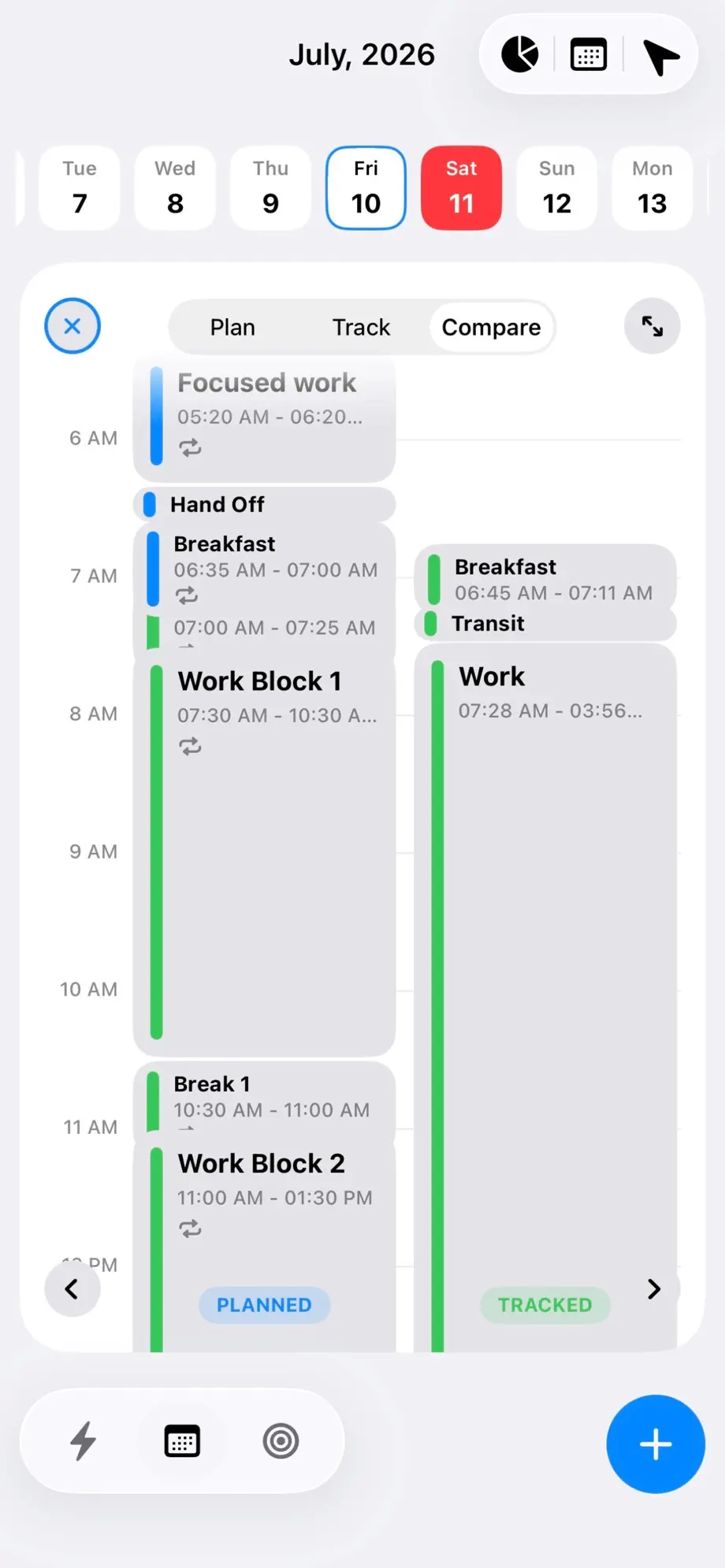
Most planners stop at intention. Sunsama and Fezer both go one step further: they treat the plan as a hypothesis and the day as the experiment. Sunsama shows you where your time actually went against what you planned; Fezer’s Compare mode draws the planned day and the tracked day side by side on the same timeline.
That shared conviction is why this page exists. If you were drawn to Sunsama because of the planned-versus-actual loop, Fezer is one of the few places you will find the same loop - implemented differently, for a different situation.
Built for a workday vs. built for a whole life
Sunsama’s centre of gravity is professional work. It assumes a desk, a calendar full of meetings, and tasks scattered across team tools - and it earns its keep by unifying them. The ritual language is about workload, burnout and finishing the workday cleanly.
Fezer’s centre of gravity is the whole day. Its planning layer organizes life into areas - health, family, work, projects - each with plans, steps and its own vision board, and steps get committed onto the same timeline as everything else. Training for a race and shipping a project claim hours from the same day, and the analytics show which areas actually received time.
The subscription question
Sunsama is subscription software with a fourteen-day free trial and no permanent free tier. That is not a criticism: it runs servers, maintains twenty-plus integrations and syncs your data across six platforms, and subscriptions are the honest way to pay for that.
Fezer is free to plan and track, with no ads - and the shape of the pricing is structural rather than promotional. There are no servers to pay for, because there is nothing to sync and nothing to integrate. You are not getting a teaser version of a paid product; you are getting an app whose design removed its own running costs.
Where your data lives
To do its job, Sunsama has to hold your data: an account, your tasks, and connections into your calendars and work tools. For a work aggregator that is a reasonable trade, and Sunsama is upfront about it.
Fezer makes the opposite trade. No account, no server, nothing transmitted - your schedule, tracked sessions, plans and vision boards exist only on your device. The cost is real: no sync, no web version, no pulling in your calendar. If custody of your data matters more than convergence of your tools, that is the trade Fezer is built around.
Feature comparison
Sunsama details are taken from its own website as of August 2026. Sunsama offers a 14-day free trial and then requires a subscription; Fezer is free to plan and track, with Fezer Plus for Compare, Analytics and unlimited plans.
| Capability | Sunsama | Fezer |
|---|---|---|
| Guided daily planning ritual | Yes - a signature guided flow for planning a realistic day | No guided flow - you lay out blocks yourself |
| Timeboxing on a visual timeline | Yes - drag tasks onto the calendar | Yes - draggable time blocks with deadline pins |
| Planned vs. actual time | Yes - analytics on where time went vs. the plan | Yes - Compare mode, side by side on one timeline |
| Pulls in tasks from other tools (Asana, Trello, ClickUp...) | Yes - 20+ integrations | Not offered |
| Calendar integrations (Google, Outlook) | Yes | Not offered |
| Focus mode | Yes - can mute distracting apps | Tracked sessions with checkpoints instead |
| Plans broken into steps and scheduled | Weekly goals and objectives | Areas, plans and steps committed onto the day |
| Vision board | Not offered | Yes - boards per plan and life area |
| Platforms | iPhone, Android, Mac, Windows, Linux, web | iPhone, iPad and Android |
| Sync across devices | Yes | Not offered |
| Account required | Yes | No account, ever |
| Data stored off-device | Yes - accounts, sync and integrations require it | No - everything stays on your device |
| Price | Subscription after a 14-day trial; no free tier | Free to plan and track; Plus from $5.99/mo |
Both products change often. If something here has gone out of date, tell us through the feedback link in the footer and we will correct it.
Which one should you actually use?
Stay with Sunsama if
- Your tasks live in Asana, Trello, ClickUp or Todoist and you need them pulled into one place.
- You plan at a desk and want the same planner on Mac, Windows or the web.
- The guided daily ritual is what keeps you consistent.
- You need Google or Outlook calendar events inside your plan.
- A work-focused tool your employer might pay for fits your situation.
Try Fezer if
- You want the planned-versus-actual loop for your life, not just your job.
- You plan from your phone, not from a desk.
- You do not want a work-tool subscription for planning your own day.
- You want plans and vision boards attached to the same schedule.
- You would rather your calendar never touched anyone’s server.
Frequently asked questions
- Is Fezer really free where Sunsama is subscription-only?
- Yes, but not in the same shape. Sunsama offers a 14-day free trial and then requires a subscription to use it at all. Fezer stays usable free forever - planning and tracking never expire - and charges only for Compare, Analytics, the extra schedule views and unlimited areas, plans and steps. It has no servers to fund, so there is nothing the price needs to cover.
- Does Fezer have Sunsama’s guided daily planning ritual?
- No. Fezer does not walk you through a guided flow. Repeating blocks carry your routine forward automatically, and you adjust the day directly on the timeline. If the ritual itself is what keeps you planning, Sunsama does that better.
- Can Fezer pull in my tasks from Asana, Trello or Todoist?
- No. Fezer has no integrations and no server component, so nothing is imported from other tools. Sunsama is the right choice if consolidating work tools is the point.
- Both apps show planned vs. actual time - what is the difference?
- Sunsama reports where your time went against your plan as part of its work-focused analytics. Fezer draws the planned day and the tracked day as two columns on the same hourly timeline in Compare mode, and its analytics break tracked time down by the areas and plans of your personal life.
- Does Fezer sync between devices like Sunsama does?
- No. Fezer stores everything on the device and never transmits it, so there is no sync. That is the deliberate cost of keeping your schedule entirely in your custody.
- Is Fezer available on Android or desktop?
- Android yes - Fezer is on Google Play. Desktop no: there is no Mac app and no web version, because everything is stored on the device.
Try Fezer for free
Free to plan and track, on iPhone, iPad and Android. No account, no ads, and nothing you write ever leaves your device.