A Structured alternative that also records how the day went
Structured is a genuinely good visual day planner, and for a lot of people it is the right answer. Fezer overlaps with it on time blocking, then adds the part most planners leave out: tracking what actually happened and putting it next to the plan.
Where Structured is stronger
Structured has been shipping since 2020, has well over a hundred thousand App Store ratings, and runs on iPhone, iPad, Apple Watch and Mac with iCloud sync between them. It is localised into more than two dozen languages, has serious accessibility work behind it, and its paid tier connects Google, Apple and Outlook calendars plus Reminders. If you need your planner on your wrist and your desktop, or you need your existing calendars pulled in automatically, Structured does things Fezer does not do today.
Fezer is new, has no collaboration or integrations, and deliberately does not sync anywhere. Those are real trade-offs, and they are the direct consequence of the design choice described below.
The gap both apps start from
A visual timeline is a big improvement over a list. You stop staring at twenty undifferentiated tasks and start seeing a day with a shape. Structured does this well and Fezer does it too.
But a timeline is still only a statement of intent. It shows the day you meant to have. Once the day is over, the plan is either quietly edited to match what happened or abandoned, and either way the information that would have made tomorrow’s plan better is gone.
What Fezer adds: a second column
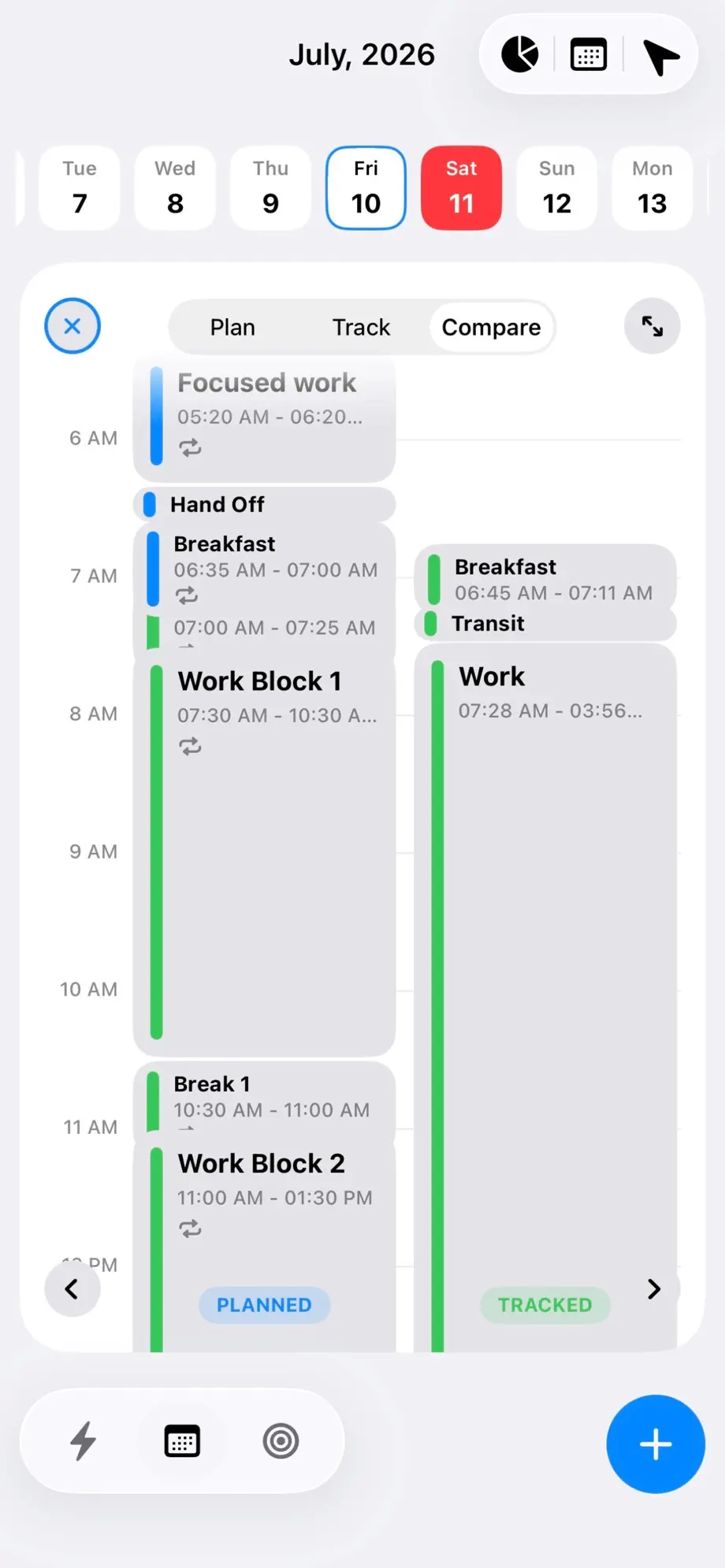
Fezer’s Schedule has three modes. Plan is the timeline you would recognize from Structured. Track records what you actually did - one tap to begin, checkpoints along the way, one tap to end. Compare puts the two side by side in the same view, hour for hour.
That third mode is the whole point. When you can see that "Deep work, 9:00-11:00" reliably starts at 9:40 and ends at 10:20, you stop writing two-hour blocks you never honour. The plan gets calibrated by evidence rather than by how you felt about last week.
Goals that claim real hours
Fezer also carries a planning layer that sits above the day. You organize work into areas, break each into plans and steps, then commit a step directly onto the schedule as a block. The chain runs plan to step to a specific hour on a specific day, and the time you spend on it is tracked against it.
The effect is that your goals compete for hours in a visible way, instead of living in a separate list that never touches the calendar.
Privacy is a design constraint, not a setting
Fezer has no accounts and no server. There is nothing to sign up for, and your schedule, plans, notes and attachments never leave the device. That is why there is no sync: there is nowhere for the planner data to sync to.
This is a genuine trade-off rather than a straight upgrade. You gain a planner that cannot leak, and you give up multi-device continuity. If continuity matters more to you, Structured’s iCloud sync is the better fit and you should use it.
Feature comparison
Structured details are taken from its App Store listing and its own site as of July 2026. Both apps are free to download; Structured sells a Pro subscription, Fezer sells Fezer Plus for Compare, Analytics and unlimited plans.
| Capability | Structured | Fezer |
|---|---|---|
| Visual day timeline | Yes - drag-and-drop timeline, colours and icons | Yes - draggable time blocks with deadline pins |
| Repeating routines | Structured Pro | Free - daily, weekdays, weekly or biweekly |
| Calendar import (Google, Apple, Outlook) | Structured Pro | Not offered |
| Time tracking of what you actually did | Not offered | Yes - one-tap sessions with checkpoints |
| Planned vs. actual comparison | Not offered | Yes - Compare mode, side by side |
| Plans broken into steps and scheduled | Sub-tasks within a task | Areas, plans and steps committed onto the day |
| Vision board | Not offered | Yes - boards per plan and life area |
| Focus / Pomodoro timer | Yes - focus timer free, timed intervals in Pro | Tracked sessions rather than a fixed Pomodoro cycle |
| AI planning assistance | Structured Pro | Not offered |
| Apple Watch and Mac apps | Yes | Not offered |
| Sync across devices | Yes - via iCloud | Not offered |
| Account required | No account needed to start | No account, ever |
| Data stored off-device | Yes - iCloud sync, calendar connections | No - everything stays on your device |
| Price | Free tier plus Pro subscription | Free to plan and track; Plus from $5.99/mo |
Both products change often. If something here has gone out of date, tell us through the feedback link in the footer and we will correct it.
Which one should you actually use?
Stay with Structured if
- You want your planner on Apple Watch or Mac as well as iPhone.
- You need Google, Apple or Outlook calendar events pulled in automatically.
- You want AI to draft your schedule and reschedule what you missed.
- You use the app in a language other than English.
- Syncing across devices matters more to you than keeping data off servers.
Try Fezer if
- You want to know where your hours actually went, not just where you meant to send them.
- Your time blocks keep drifting and you want a feedback loop that fixes them.
- You want goals that claim real hours on a real day.
- You would rather your plans never left your device.
- You want repeating routines without paying for them.
Frequently asked questions
- Is Fezer free?
- Partly. Planning your day and tracking it are free forever, with no account and no ads - repeating blocks, deadline pins, one-tap tracking with checkpoints and the schedule timeline all sit in the free tier. Compare, Analytics, the list and month views and unlimited areas, plans and steps are Fezer Plus, at $5.99 a month or $55.99 a year with a week free on the yearly plan.
- Can Fezer import my Google or Apple Calendar?
- Not today. Fezer does not connect to external calendars, because it has no server component and does not request access to your calendar accounts. If automatic calendar import is essential to you, Structured Pro handles it well.
- Does Fezer sync between my devices?
- No. Fezer stores everything locally on each device and never sends it anywhere, so there is no sync between devices. This is deliberate - it is the same design decision that means your data cannot be exposed by a server breach.
- What does Compare mode actually show?
- Two columns for the same day: the blocks you planned, and the sessions you actually tracked, aligned on the same hourly timeline. You can see which blocks started late, which ran over and which never happened.
- Can I switch from Structured to Fezer easily?
- There is no automatic import. Most people rebuild their recurring blocks once - a morning routine, standing focus blocks, regular commitments - which takes a few minutes, and repeating blocks carry them forward from then on.
- Is Fezer available on Android?
- Yes. Fezer is on Google Play, and the Android app carries the same planning, tracking and Compare loop as the iPhone one. There is no Mac app and no web version, because everything is stored on the device.
Try Fezer for free
Free to plan and track, on iPhone, iPad and Android. No account, no ads, and nothing you write ever leaves your device.