Time blocking that survives contact with a real day
Time blocking means giving every hour a job before the day starts. Fezer makes the blocks fast to place, easy to repeat and honest at the end of the day - because it also shows what actually happened.
Why time blocking usually breaks down
Time blocking fails for two predictable reasons. First, maintenance: rebuilding the same morning routine block by block every day gets old within a week. Second, drift: the plan says 9:00 deep work, reality says 9:40, and there is no feedback loop to correct for it - so the plan slowly becomes fiction.
Fezer addresses both. Repeating blocks carry your routine forward automatically, and the Compare view confronts the plan with the tracked day so your blocks get more accurate over time.
How time blocking works in Fezer
Everything happens on the Schedule tab, a vertical timeline of your day.
- 1
Add blocks in Plan mode
Create a block, give it a name and a time range. Blocks are visual and draggable - reshuffling the afternoon takes seconds.
- 2
Put routines on repeat
A block can repeat Every Day, on Weekdays, Every Week or Every 2 Weeks. Your morning routine and standing focus blocks build themselves.
- 3
Block time for your goals
From any plan, choose Commit and then Work on to turn a step into a scheduled block - optionally repeating. Your plans claim real hours instead of waiting in a backlog.
- 4
Check the blocks against reality
Track the day, then open Compare. Planned blocks and tracked time sit side by side, so you can see which blocks are realistic and which are wishful thinking.
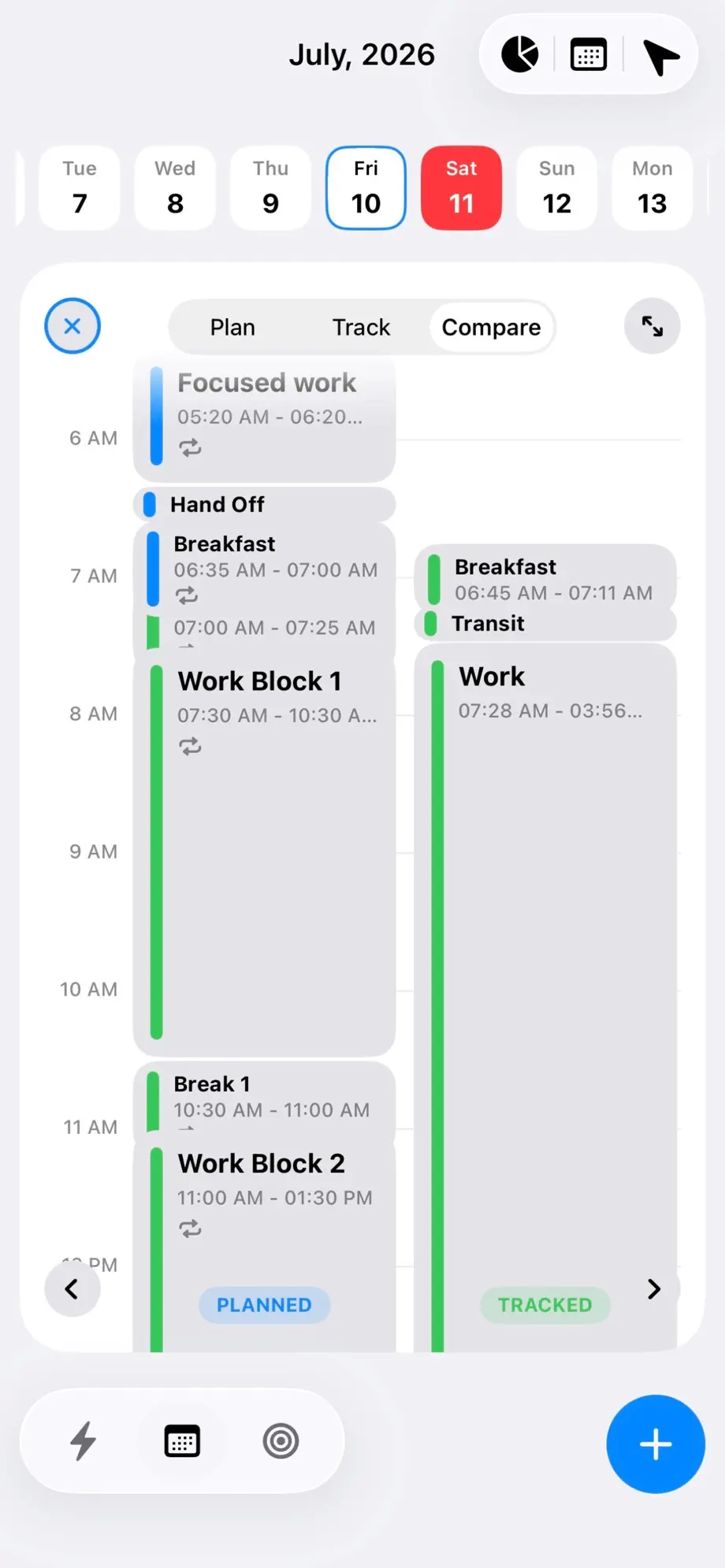
Example: protecting deep work
You set a "Focused work" block from 5:20 to 6:20 every weekday, followed by breakfast and two longer work blocks. Because the blocks repeat, the structure is already there each morning - you only adjust the exceptions.
After a week, Compare shows the early block holds up on Tuesdays and Wednesdays but collapses on Fridays. So you move Friday’s deep work to the afternoon. That is the point of time blocking with feedback: the schedule adapts to how you actually work.
What you get
Visual time blocks
Draggable blocks on a day timeline, quick to add and rearrange.
Repeating blocks
Every Day, Weekdays, Every Week or Every 2 Weeks - routines build themselves.
Work on commitments
Turn plan steps into scheduled blocks without leaving your plans.
Compare mode
Planned and tracked columns side by side for every day.
Deadline pins
Deadlines sit on the same timeline as your blocks.
On-device data
Your schedule stays on your phone or tablet. Anonymous product analytics do not include what you wrote.
Own your day with Fezer
Free to plan and track, on iPhone, iPad and Android. No account, no ads, and nothing you write ever leaves your device.