For when the list stops being the problem
Todoist may be the best pure to-do list ever built, and if capturing and organizing tasks is what you need, you should probably just use it. Fezer is for the moment after that - when the list is immaculate, the days keep vanishing anyway, and the question stops being "what needs doing?" and becomes "what happened to my time?"
Where Todoist is stronger
Todoist has been refined for nearly two decades and it shows. Capture is instant and natural-language dates ("every other friday at 4pm") are best in class. It runs on essentially everything, syncs seamlessly, and scales from a grocery list to shared team projects with assignments, comments and permissions. Its free tier is genuinely usable, and the Pro tier adds a calendar layout, task durations and AI assistance.
Fezer competes with none of that breadth. It has no collaboration, no natural-language capture and no integrations. It is built around one loop Todoist does not have, described below.
A list records obligations. A day is made of hours.
The to-do list model has a known failure mode: it grows. Every commitment, idea and someday-item accumulates in one place, each morning opens on dozens of undifferentiated entries, and choosing what to do becomes its own job. Todoist manages the pile better than anyone - projects, filters, priorities - but the model is still the pile.
Fezer’s model is the day. Twenty-four hours, some already spoken for, the rest yours to allocate. Work gets a block with a start and an end; deadlines pin to the timeline of the day they are due; the Now view holds up exactly one current commitment. The constraint is the feature: a day, unlike a list, cannot quietly grow to hold everything.
The loop a checkmark cannot close
A completed task tells you that something got done - not what it cost. Six checked items can describe a focused morning or a fourteen-hour slog, and the list cannot tell the difference. So next week gets planned with the same optimism as last week, indefinitely.
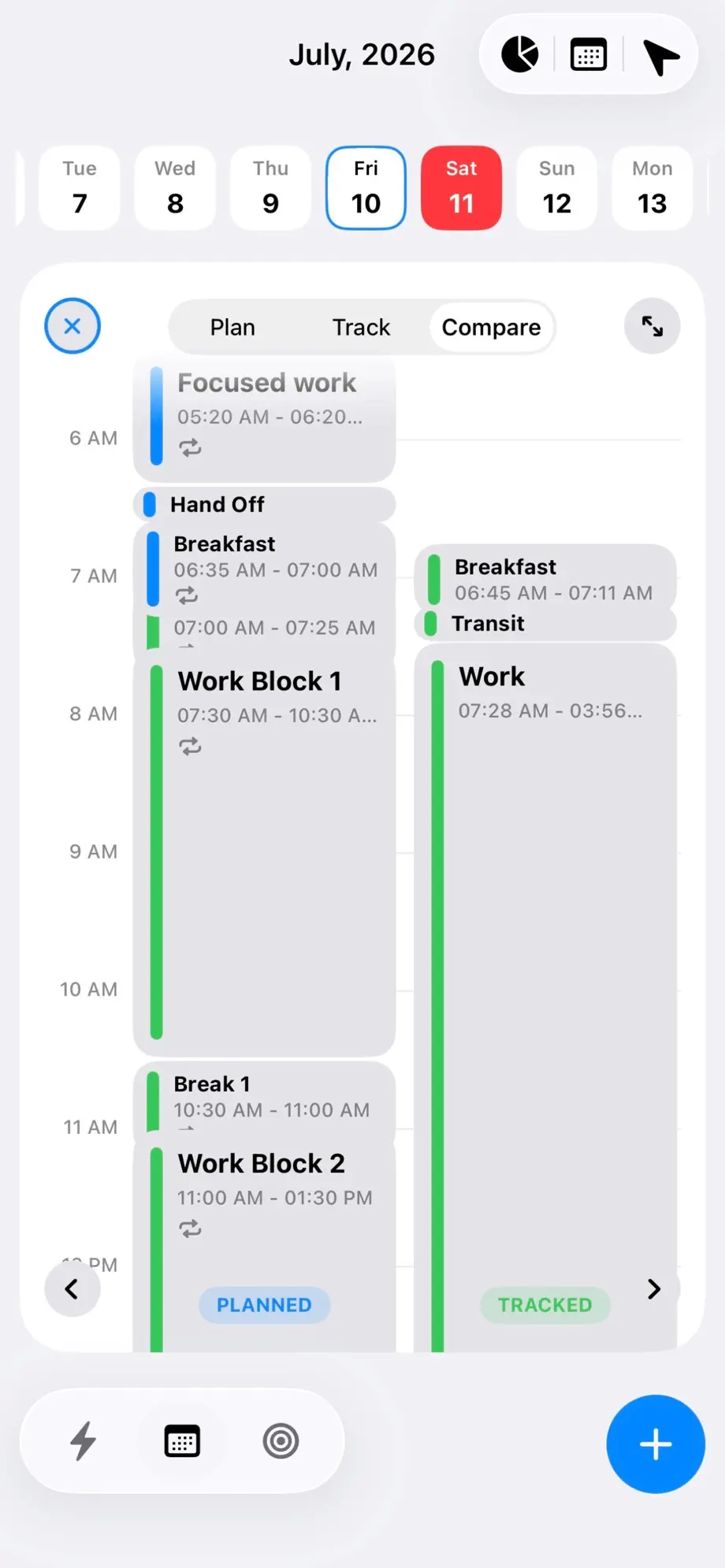
Fezer closes the loop with evidence. Track a session with one tap as you work, then let Compare mode draw the planned day and the real one side by side: the block that started late, the estimate that was off by double, the untracked hours that belonged to no plan at all. That feedback - not a better-organized list - is what makes the next plan more honest than the last.
Projects vs. areas
Todoist organizes work into projects and sub-tasks, which suits deliverables. Fezer organizes life into areas - areas like health, family and work - each holding plans with a written end state, ordered steps, and a vision board. A step becomes real by being committed onto the schedule: pinned as a deadline or blocked as time.
Because tracked time attaches to areas and plans, Fezer’s analytics answer a question a productivity streak cannot: which areas of your life actually received hours this week, and which only received good intentions.
Free to plan, Plus to analyse
Todoist’s free tier is real, and its paid tiers fund a sync service, collaboration infrastructure and AI features - a fair exchange for a cloud product.
Fezer is free to plan and track, with no ads and no account, because there is no server to pay for. Compare, Analytics, the extra schedule views and unlimited areas, plans and steps are Fezer Plus. Everything you write stays on your device, which also means no sync and no web access. If those are dealbreakers, Todoist is the safer choice.
Feature comparison
Todoist details are taken from its own website as of August 2026. Todoist has a free tier plus Pro and Business subscriptions; Fezer is free to plan and track, with Fezer Plus for Compare, Analytics and unlimited plans.
| Capability | Todoist | Fezer |
|---|---|---|
| Quick capture with natural language | Yes - best-in-class NLP dates and recurrence | Manual - blocks are placed on the timeline by hand |
| Projects, labels and filters | Yes - with more of each in paid tiers | Areas, plans and steps instead of projects |
| Visual day timeline | Calendar layout in Pro | Yes - free, and the primary surface |
| Task durations | Pro | Every block has a start and an end by definition |
| Recurring items | Yes - natural-language recurrence | Repeating blocks: daily, weekdays, weekly, biweekly |
| Time tracking of what you actually did | Not offered | Yes - one-tap sessions with checkpoints |
| Planned vs. actual comparison | Not offered | Yes - Compare mode, side by side |
| Vision board | Not offered | Yes - boards per plan and life area |
| Collaboration and shared projects | Yes - assignments, comments, team workspaces | Not offered |
| AI assistance | Pro and Business | Not offered |
| Platforms | iPhone, iPad, Android, Mac, Windows, web and more | iPhone, iPad and Android |
| Sync across devices | Yes | Not offered |
| Account required | Yes | No account, ever |
| Price | Free tier plus Pro and Business subscriptions | Free to plan and track; Plus from $5.99/mo |
Both products change often. If something here has gone out of date, tell us through the feedback link in the footer and we will correct it.
Which one should you actually use?
Stay with Todoist if
- Frictionless capture from anywhere is the feature you live by.
- You share projects with a team, a partner or clients.
- You need your tasks on desktop and the web.
- Your work is genuinely list-shaped: many small items, few time decisions.
- You want AI help drafting and organizing tasks.
Try Fezer if
- Your list is well-kept and your time still disappears.
- You want every commitment to occupy real hours on a real day.
- You want to see planned time against actual time, every day.
- You want life areas and plans above the task level.
- You want the loop on your device, free to plan and track.
Frequently asked questions
- Is Fezer a to-do list app like Todoist?
- No. Fezer has no standalone task list. Commitments exist as time blocks on the day, deadline pins, or steps inside plans. If you mainly need a capture-everything list, Todoist is the better tool - some people use both, capturing in a list and planning their hours in Fezer.
- Can Fezer import my Todoist tasks?
- No. Fezer has no integrations or server to import through. In practice a day plan holds far fewer items than an accumulated list, so most people rebuild only their standing routines as repeating blocks, which takes a few minutes.
- Todoist Pro has a calendar layout. How is Fezer different?
- Todoist’s calendar layout is a paid view onto your task list. In Fezer the day timeline is the entire model, free: blocks have durations by definition, deadlines pin to the day, tracking lands beside the plan, and Compare shows the two against each other - a loop the calendar view does not attempt.
- Does Fezer do recurring tasks?
- It does repeating blocks - daily, weekdays, weekly or biweekly - which cover routines and standing commitments. It does not parse natural-language recurrence like "every other Friday"; Todoist remains unmatched at that.
- Does Fezer work with a team?
- No. Fezer is strictly personal - no sharing, no assignments, no comments. Everything stays on your device, which is precisely why collaboration is out of scope.
- Is Fezer available on Android or the web?
- Android yes - Fezer is on Google Play. The web, no - everything is stored on the device, so there is nothing to sign in to.
Try Fezer for free
Free to plan and track, on iPhone, iPad and Android. No account, no ads, and nothing you write ever leaves your device.