A TickTick alternative that starts with your hours, not your list
TickTick is one of the most complete task managers ever shipped - lists, calendar, habits, Pomodoro, collaboration, everywhere. Fezer is not trying to out-feature it. It starts from a different unit: not the task, but the hour, and what actually happened during it.
Where TickTick is stronger
TickTick runs on practically everything - iPhone, iPad, Android, Mac, Windows and the web - with sync across all of it. Capturing a task is close to effortless: natural-language input understands "pay rent friday 9am", and tasks come in via widgets, voice and browser extensions. Around the core list it has built a habit tracker, a Pomodoro timer with focus statistics, an Eisenhower priority matrix, Kanban and timeline views, and shared lists for working with other people. It has a generous free tier and a decade of polish.
Fezer has none of that breadth. It has no collaboration and no natural-language capture. What it has is a different starting point, described below.
List-first vs. time-first
TickTick, at its heart, is a list. A superb one - but the organizing question is "what needs to be done?", and the calendar is one of several views onto the answer. It is possible to plan your time in TickTick, and many people do, but the app does not insist on it.
Fezer inverts the hierarchy. The organizing question is "what is happening with your hours?" - the day timeline is the primary surface, everything you commit to occupies actual time on it, and the Now view keeps exactly one current commitment in front of you. A task without a time is not yet a plan in Fezer’s model.
What happens after the checkmark
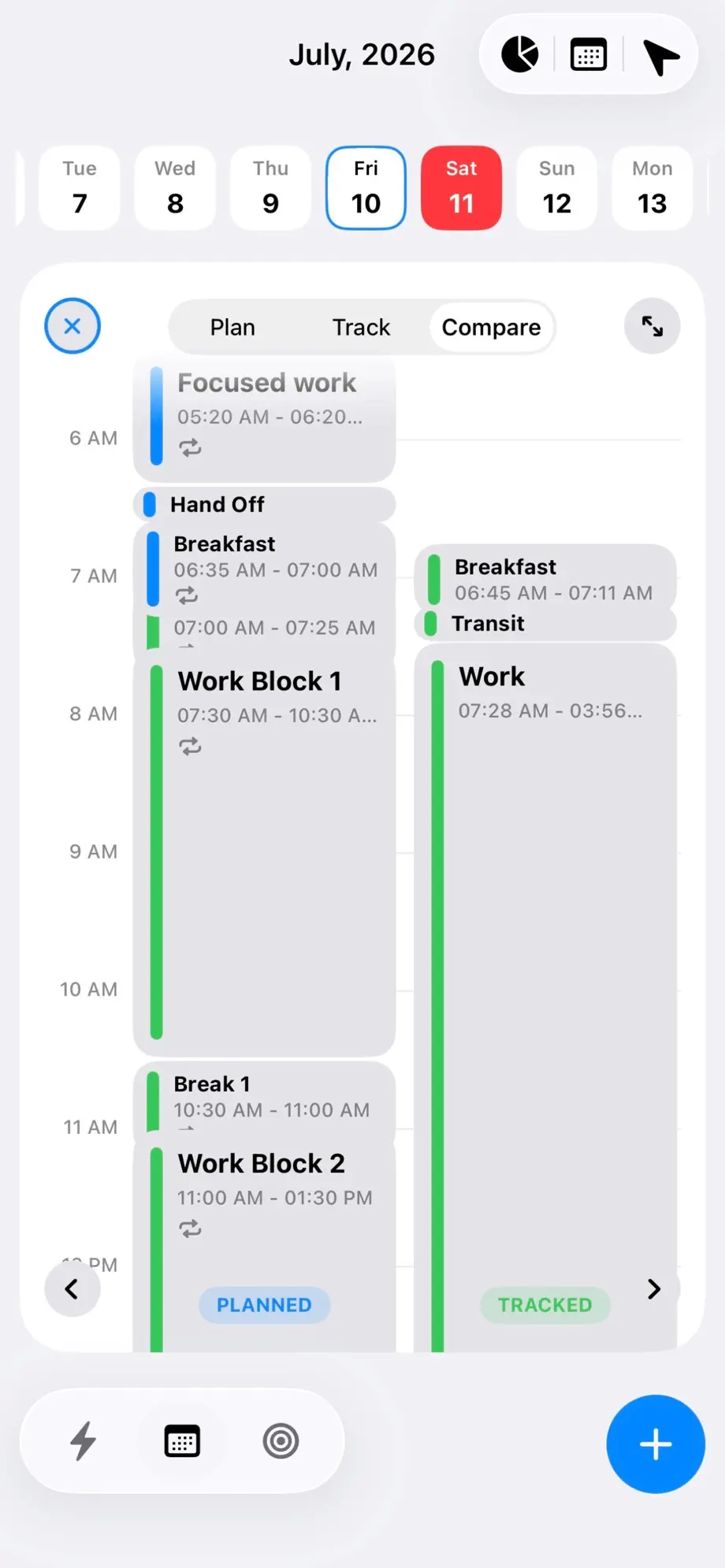
TickTick records that things got done, and its Pomodoro timer can record focused stretches. What it does not do is put your planned day and your real day side by side and let one correct the other.
That is Fezer’s core loop. Plan the day in blocks, track sessions with one tap as the day runs, then open Compare and see both columns on the same hours: the block that started forty minutes late, the "quick" task that ran to lunch, the afternoon that vanished into work no list ever contained. Estimates get calibrated by evidence, which is the part checkmarks cannot teach.
Where goals live
In a task manager, a goal is usually a list or a tag - a container of tasks. Fezer gives your work its own structure: areas for the parts of your life, plans with a written beginning and end state, ordered steps, and a vision board attached to each area and plan.
The structural difference shows up in the analytics. Because tracked time attaches to areas and plans, the week answers a question a completed-task count cannot: which parts of your life actually received hours, and which received intentions.
Accounts, sync and the price of everywhere
TickTick’s everywhere-sync requires an account, and your tasks live on its servers - the normal architecture for a cross-platform product, and TickTick maintains a paid Premium tier on top of a capable free one.
Fezer has no account and no server, and Fezer is free to plan and track, with no account and no ads; Compare, Analytics, the list and month views and unlimited areas, plans and steps are Fezer Plus, at $5.99 a month or $55.99 a year with a week free on the yearly plan. Everything you write stays on your device. The cost is that "everywhere" shrinks to your phone and tablet. That is the trade, stated plainly.
Feature comparison
TickTick details are taken from its own website as of August 2026. TickTick has a free tier and a Premium subscription; Fezer is free to plan and track, with Fezer Plus for Compare, Analytics and unlimited plans.
| Capability | TickTick | Fezer |
|---|---|---|
| Quick capture with natural language | Yes - NLP dates, voice, widgets, extensions | Manual - blocks are placed on the timeline by hand |
| To-do lists, tags and filters | Yes - lists, tags, filters, Kanban, timeline views | Not the model - work lives as blocks, deadlines and plan steps |
| Visual day timeline | Calendar views across days, weeks and months | Yes - the day timeline is the primary surface |
| Repeating routines | Yes - recurring tasks | Yes - repeating blocks: daily, weekdays, weekly, biweekly |
| Habit tracker | Yes | Not offered |
| Pomodoro / focus timer | Yes - Pomodoro with focus statistics | Tracked sessions with checkpoints instead of fixed cycles |
| Planned vs. actual comparison | Not offered | Yes - Compare mode, side by side |
| Plans with structure | Lists and tags act as containers | Areas, plans, ordered steps, committed onto the day |
| Vision board | Not offered | Yes - boards per plan and life area |
| Collaboration and shared lists | Yes - share lists, assign tasks | Not offered |
| Platforms | iPhone, iPad, Android, Mac, Windows, web | iPhone, iPad and Android |
| Sync across devices | Yes - account-based cloud sync | Not offered |
| Account required | Yes - for sync and most use | No account, ever |
| Price | Free tier plus Premium subscription | Free to plan and track; Plus from $5.99/mo |
Both products change often. If something here has gone out of date, tell us through the feedback link in the footer and we will correct it.
Which one should you actually use?
Stay with TickTick if
- Fast capture is the feature - you live by getting things out of your head instantly.
- You need your tasks on Windows, Mac or the web.
- You share lists with family or colleagues.
- You want habits, Pomodoro and tasks in a single app.
- A to-do list genuinely is the right model for your work.
Try Fezer if
- Your list is fine but your days keep disappearing anyway.
- You want to see planned time against actual time, not just completed counts.
- You want plans with real structure that claim real hours.
- You want a time-first planner whose paid tier is the analysis layer, not the day itself.
- You want a planner that works with no account and no cloud.
Frequently asked questions
- Is Fezer free? TickTick already has a free tier.
- Yes, and the difference is where the ceiling sits. TickTick’s free tier is capable but holds some features for Premium. Fezer’s free tier never expires and its paid tier is narrower: repeating blocks, deadline pins, one-tap tracking with checkpoints and the schedule timeline are free forever, with no ads. Compare, Analytics, the list and month views and unlimited areas, plans and steps are Fezer Plus, at $5.99 a month or $55.99 a year.
- Can Fezer import my tasks from TickTick?
- No. Fezer has no import and no server to import through. Most people rebuild their standing commitments as repeating blocks once, which takes a few minutes - and a plan built from blocks tends to carry far fewer items than an accumulated task list.
- Does Fezer have a habit tracker?
- Not as a separate feature. The closest equivalent is a repeating block - a habit with an actual time reserved for it - plus the tracked record of whether it happened. If streak-style habit tracking is what keeps you going, TickTick does that well.
- Does Fezer have a Pomodoro timer like TickTick?
- No. Fezer records sessions of whatever length actually happened, with checkpoints you drop along the way, rather than imposing fixed work-break cycles. The record reflects your real rhythm instead of a prescribed one.
- Can I use Fezer on my Mac or on Android?
- Android yes - Fezer is on Google Play. Mac no, and because it stores everything on-device there is no web version either.
- Why would I give up TickTick’s capture speed?
- You might not - some people keep a capture tool and plan their hours in Fezer. The argument for time-first planning is that a captured task costs nothing and changes nothing; a block on your timeline is a decision about your day. Fezer optimizes for the decision, not the capture.
Try Fezer for free
Free to plan and track, on iPhone, iPad and Android. No account, no ads, and nothing you write ever leaves your device.